Quickstart
Let’s first grab some example data from the GitHub repository:
[1]:
import numpy as np
import requests, io
import matplotlib.pyplot as plt

demo_data_file = requests.get("https://github.com/TutteInstitute/temporal-mapper/raw/docs/docs/data/mapper_demo_data.npy")
X = np.load(io.BytesIO(demo_data_file.content))
X = X[np.argsort(X[:,0])]
# shape (n_samples, n_features), the 0th feature is time
We’ll use projection to the \(x\)-axis as our Morse-type function, and a sklearn clusterer to do single-linkage clustering. The time_index keyword argument in fit determines which axis is the Morse-type function, by default it is -1. Here’s how you fit a TemporalMapper:
[2]:
import temporalmapper as tm
from sklearn.cluster import AgglomerativeClustering

## Single-linkage clustering
clusterer = AgglomerativeClustering(
    linkage = "single",
    distance_threshold = 0.1,
    n_clusters = None,
)

mapper = tm.TemporalMapper(
    clusterer = clusterer,
    n_slices = 10
)
mapper.fit(X, time_index=0)
[2]:
TemporalMapper(clusterer=AgglomerativeClustering(distance_threshold=0.1,
                                                 linkage='single',
                                                 n_clusters=None),
               data=array([[ 0.78120236],
       [ 0.94058764],
       [ 0.8615557 ],
       ...,
       [-0.90433927],
       [ 0.31418258],
       [-1.10363033]], shape=(23000, 1)),
               n_slices=10,
               time=array([-3.20536694, -3.20242743, -3.1924893 , ...,  3.20039771,
        3.20529909,  3.21932717], shape=(23000,)))
In a Jupyter environment, please rerun this cell to show the HTML representation or trust the notebook. On GitHub, the HTML representation is unable to render, please try loading this page with nbviewer.org.
Parameters
| time | array([-3.205...hape=(23000,)) | |
| data | array([[ 0.78...pe=(23000, 1)) | |
| clusterer | Agglomerative...clusters=None) | |
| n_slices | 10 | |
| n_neighbors | 5 | |
| overlap | 0.5 | |
| inclusion_threshold | 0.01 | |
| slice_method | 'time' | |
| density_based | True | |
| kernel | <function squ...x7be8e02fe840> | |
| kernel_params | None | |
| verbose | False |
AgglomerativeClustering(distance_threshold=0.1, linkage='single',
n_clusters=None)Parameters
The output of Mapper is a directed graph; you can access the graph as a NetworkX object via TemporalMapper.graph:
[3]:
mapper.graph
[3]:
<networkx.classes.digraph.DiGraph at 0x7be8dec5d4d0>
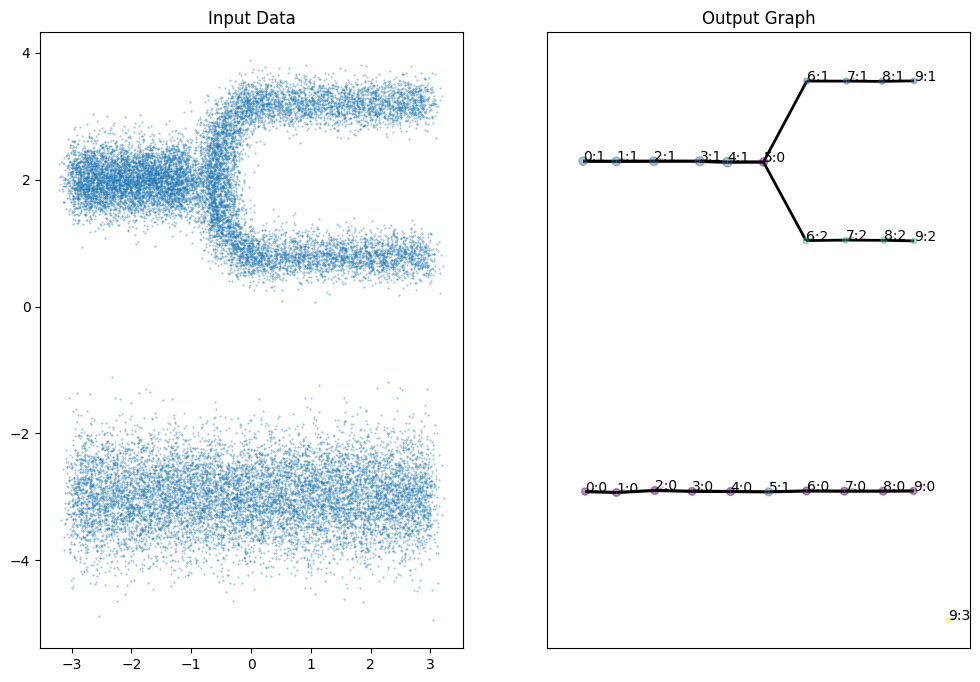
You can also plot the graph using TemporalMapper.temporal_plot. We set layout='semantic' so our graph will align with our input data.
[4]:
fig, (ax1,ax2) = plt.subplots(1,2, figsize=(12,8))
ax1.set_title("Input Data")
ax1.scatter(
    X[:,0], X[:,1], s=0.2, alpha=0.5
)
ax2.set_title("Output Graph")
ax2 = mapper.temporal_plot(ax=ax2, layout='semantic')
plt.show()
If you have Plotly installed, you can also get an interactive HTML/JS plot:
[5]:
mapper.interactive_temporal_plot(layout='semantic')
Data type cannot be displayed: application/vnd.plotly.v1+json